

How to Start a WordPress Blog with Lyrical Host (10% off!)
Last updated on 27 December 2024
This post may contain affiliate links. If you make a purchase with one of these links, I recieve a small commission at no additional cost to you. Read the full Affiliate Policy.

Looking to start a WordPress blog with Lyrical Host?
Well, you’re in the right place! In this post, I’m going to share with you what I wish I knew back when I start my own self-hosted blog: how to start a WordPress blog with Lyrical Host.
When I first started blogging, I went straight for what I already knew: Blogger. Blogger was an excellent starting point for me, and I soon learnt the ways to best utilise the functions it had to my advantage. It was great for what I wanted it to be: an online platform in which to share my stories. But what I discovered later was I really wanted to know how to start a WordPress blog.
It wasn’t until 2016 that I finally made the move from Blogger to WordPress, and that one simple action changed my blogging game. Despite the fact that Blogger was a great way to kick start my blogging journey, after moving to WordPress and discovering how much control I had over my blog I realised I should have started off on WordPress from the beginning. I should have googled how to specifically start a WordPress blog in the early days.
10% Discount on your first payment: SPLENDIDSHAMBLES

So, how do you actually start a WordPress blog?
It’s actually a lot simpler to start a WordPress blog than it seems. There are four main steps you’re going to need to take:
- Choose and subscribe to a host
- Choose a domain name
- Install WordPress
- Actually write your blog (the fun part!)
Before we dive into how to start a WordPress blog with Lyrical Host, let’s talk about your domain name.
What is a domain name?
A domain name is the name of your site, or the URL that you want your readers to go to. In my case, that’s www.thissplendidshambles.com.
Choosing a domain name for your blog is something you’ll have to decide for yourself. If you already have a name in mind, fantastic! If you don’t, do some brainstorming and ask yourself some questions, such as:
- What am I going to be blogging about?
- Who is my target audience?
- What keywords might people use to search for the types of posts I’m going to share?
If you’ve got a good idea of where you’re headed, it’s going to be a lot easier to choose a name that you love, and one that is going to be unique for people to remember. While This Splendid Shambles doesn’t immediately tell readers what my blog is about, it’s essentially a lifestyle blog, and with that comes a little bit of everything. It’s all the things that I love, wrapped up in one splendid shambles.
Once you’ve chosen a blog name, you’ll need to secure a domain name to go with it. That’s the URL.

Choosing Lyrical Host for your WordPress blog
Before we get into how we need to look at what.
What is a blog host?
When you create a blog, all the information associated with it (the text, images, links etc) need to be sitting somewhere on the internet. That’s where a host comes in. Note, this is different from WordPress, which is just the means of creating a blog. You still need to blog to sit somewhere online and be hosted by someone.
What hosting company should I use?
While there are many hosting providers out there, and I’ve used a couple, I would highly recommend Lyrical Host. I recently transferred (2022) from Bluehost to Lyrical Host, and I have loved every moment of being with them.
As well as affordable blog hosting, Lyrical Host has a plethora of other amazing services which you get when you sign up.
- Unlimited subdomains
- SSL Certificate
- Free website and email migration
- Free theme installation
- Free speed analysis
- A HUGE blogging and resource library
- Exclusive stock photos every single month
- An active Facebook Community
- Anniversary tree planting
- and more!
Not only is Lyrical Host super easy to set up, but they have impeccable customer service! During my move to Lyrical Host, I had so many questions (I was quite nervous!) but they answered every question I had in such a timely manner.

Choosing your Lyrical Host plan
Choose the plan that’s going to work best for you. Lyrical Host has 3 plans currently available:
- Tiny
- Mighty
- Boss
Each plan builds on the other, but the basic Tiny package is fantastic for beginners. You can view the cost of each plan in US Dollars, Canadian Dollars, Australian Dollars, Euros and Pounds.
You can also choose to pay for your plan monthly or annually. I go with annually, but what I tend to do is figure out how much I need to pay each month, and I put that directly into a separate account, so when it comes time to pay for my plan once a year, I have the money all ready to go, because I’ve put a little aside throughout the year.
How to purchase a Lyrical Host plan
- Head to Lyrical Host
- In the top navigation, choose Order Domains/Hosting > Buy WordPress Hosting
- Click the “Order Now” button next to the “Tiny” hosting package (or whichever plan you’re going with)
Choosing a domain name
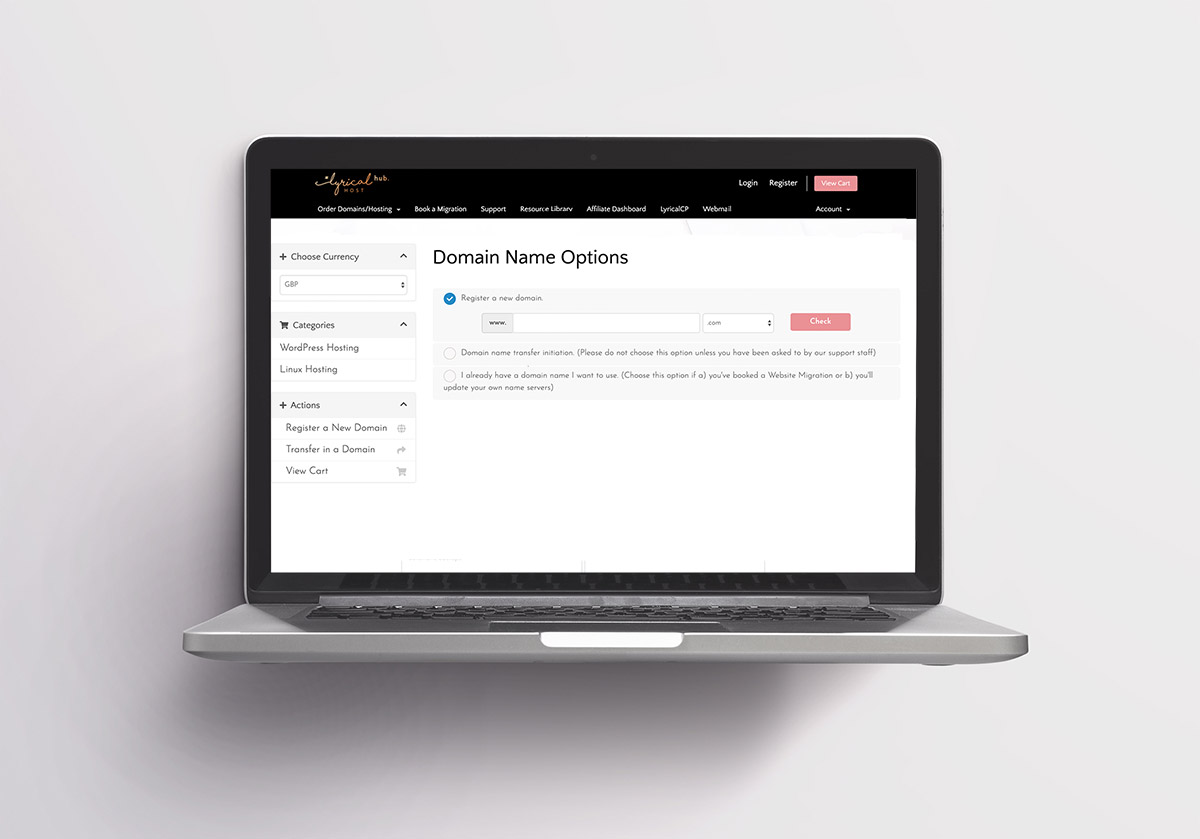
Remember that domain I mentioned before? Here’s where Lyrical Host will let you know if there is already a website out there with the domain name you want.
Don’t have a domain name? Enter your preferred name option in the box and click “Check” to see if it’s available to register. Once you’ve found an available name you’re happy with, click “Continue.”
Already have a domain name? If you’re moving from another host and transferring a domain name, choose the bottom option: “I already have a domain name I want to use.” Choose this option if a) you’ve booked a Website Migration or b) you’ll update your own name servers). Then enter the first part of your domain name in the first box and the extension (com, net, org or similar, without the . in front) in the second box.
Paying for your hosting
Next you need to choose how you’d like to pay for your hosting and domain. You can choose to either pay monthly, six-monthly or yearly. And once you’ve chosen, select ‘Continue’.
Checking your details
Go over all your details to make sure they’re correct.
Want 10% off your first payment? I gotchu! Use the code SPLENDIDSHAMBLES at the checkout and get 10% off!
When you’re ready, click ‘check out’ and enter your billing details. Agree to the terms and conditions, and then hit ‘complete order’.
Email notifications
After clicking ‘complete order’ you’ll start to receive some emails. One will be a Welcome Email from Lyrical Host and you’ll want to check that one out especially. It will include a link with all the details you need to get you started on Lyrical Host, and if you registered a new domain, you may also get a third-party email asking you to confirm your ownership and point you to the right settings to hide your contact information from being displayed in a public directory.
How to set up your WordPress for the first time
So now you have a Lyrical Host account, domain name and hosting plan! It’s time to set up WordPress.
To install WordPress, you’ll need to head over the Lyricalcp. This is at the top of Lyrical Host (once you’ve logged in), in the navigation bar. You’ll need to log into the Lyricalcp using your email and password.
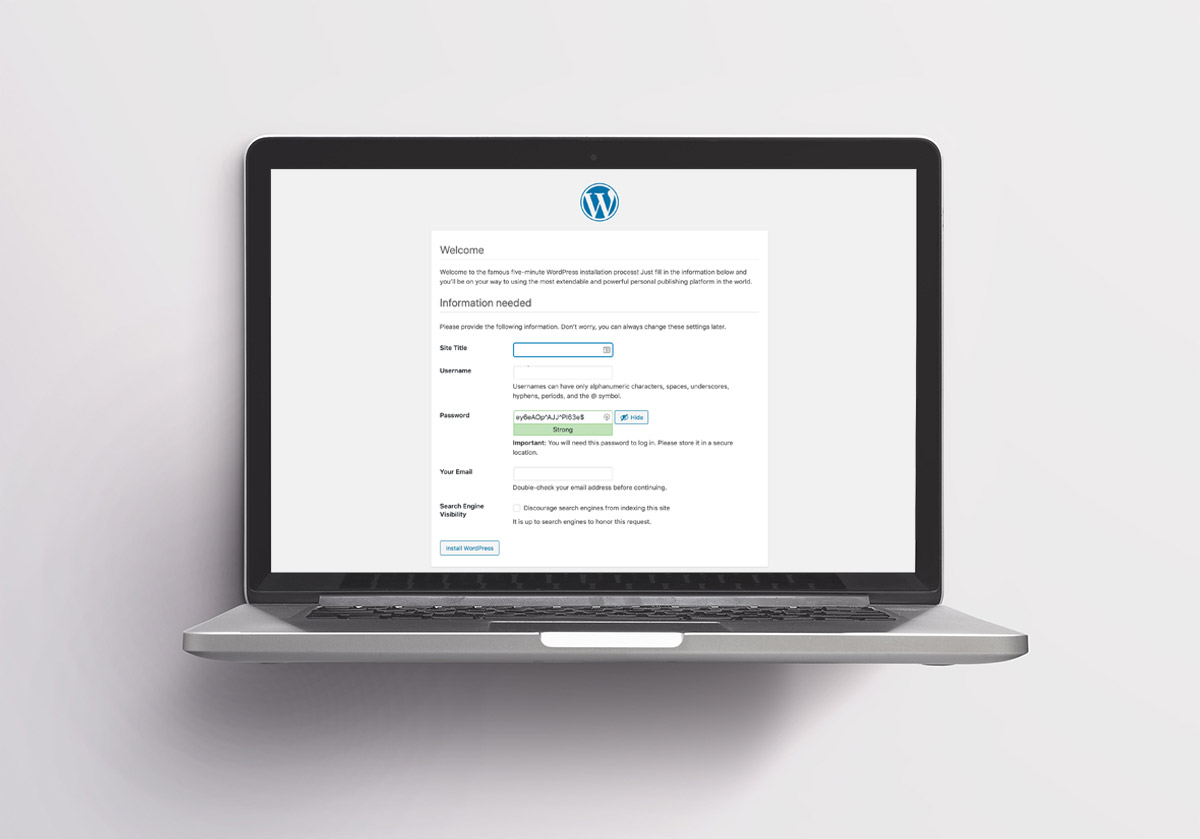
Then click Manage. You’ll see that you don’t currently have WordPress installed, so to get start, click ‘WordPress Install wizard’.
The next WordPress screen should give you an opportunity to input in your site name, username, password and email, and once you’ve entered all your details, hit ‘Install WordPress’. (See above image.)
And you’re ready to go! You have WordPress! You’ll hopefully see a success screen, which you can follow to get to your WordPress Dashboard.
Become familiar with the WordPress dashboard
If this is your first time using WordPress, then chances are you don’t know where to start. Understandable! There are a lot of tools and amazing features with a WordPress site, but it can be a bit much when you’re starting out.
Click here to check out all the videos about the WordPress dashboard to get you started. It’s super helpful to have all these short videos in one place, so I really recommend checking them out.
Choosing your theme
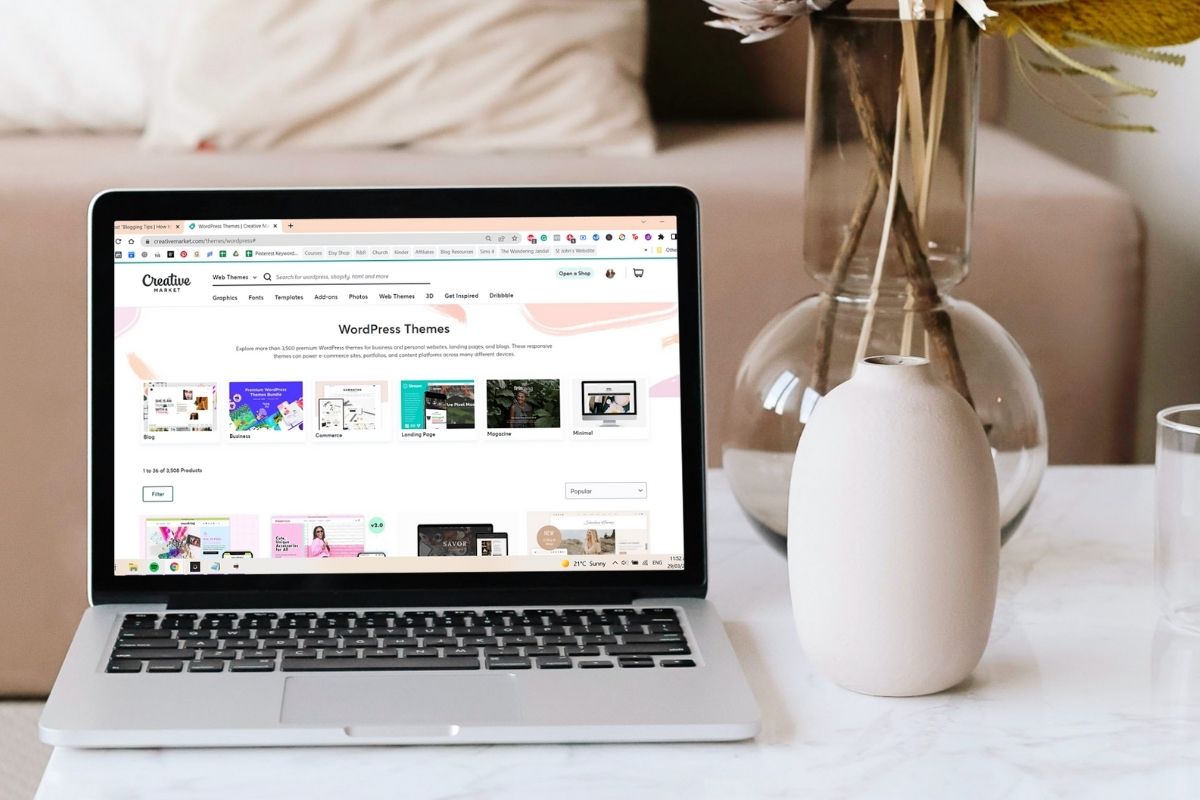
Once you’re more familiar with the WordPress dashboard, you can start putting together your Theme. The ‘theme’ is the structure of your blog or the framework you use to populate your new site with blog posts, pages, links and images.
As well as purchasable themes, you can also find a tonne of freebies, both on WordPress, and online by other creators. Check out the Creative Market for some stunning WordPress themes.
Just be sure that they’re responsive (they move easily with different screen sizes), and they are updated regularly, otherwise you may run into some strife in the years to come.
Once you’ve chosen your theme (remember you can change it at any time!), you can start adjusting it to suit what you need/want. Every theme is going to behave a little differently, and the set-up for each theme will be different. I won’t go into much detail here for this reason, but if you’re having trouble with your theme set-up, please feel free to book a call and we can look at it together.

You made it!
Congratulations! You’ve just created a self-hosted WordPress blog with Lyrical Host! Welcome to the family!
Need some more Blogging Tips?
- How To Do A Blog Audit On Your Site
- 1:1 Blogging Support
- 5 Ways Scheduling Blog Posts will Change your Life
- 5 Websites for Blogging Resources
- 4 Ways for Bloggers to Engage Their Readers
Lyrical Host Promo Code – Discount 10% off
You can get 10% off your first payment by using the Lyrical Host promo code SPLENDIDSHAMBLES at the checkout!
Have any questions on how to start a WordPress blog with Lyrical Host?
Drop me a comment and I’ll do my best to answer!
*Originally published July 2020. Updated March 2022.

Anjali Kay
Anjali Kay is an Aotearoa New Zealand-based blogger and book lover sharing travel inspiration, bookish posts, the occasional creative project, and a lot of practical blogging tips here at This Splendid Shambles. Based in Auckland, she's been writing book reviews and travel posts, sharing creative projects and blogging tips since she started her first blog in 2009. When she's not working on her own blog, Anjali also offers blog coaching and support for bloggers who want real guidance from someone who's actually done the work, and is a few chapters ahead of them.


Having fun? Check out these posts!

Faceless Marketing and Anonymous Blogging: What’s the deal?

How to Make Blogging Friends
