
The StoryGraph vs Goodreads: What You Need to Know about Changing Book Tracking App
Last updated on 29 June 2026
This post may contain affiliate links. If you make a purchase with one of these links, I recieve a small commission at no additional cost to you. Read the full Affiliate Policy.

Did you see the reasonably new kid on the block for bookworms? The StoryGraph is gaining in popularity, even as you read this sentence. But what is The StoryGraph exactly, and how is it different to what you probably (likely?) already use: Goodreads? I had the exact same thoughts when I learnt about StoryGraph for the first time in 2022. So that’s what we’re going to look at! Goodreads vs StoryGraph.
What The StoryGraph is, how to use it, what the Pros and Cons are, and if you should give up Goodreads in favour of The StoryGraph (my thoughts might surprise you!).
Let’s get into it!
What is Goodreads?
Goodreads is a popular online bookshelf, in essence. It allows users to track books they’ve read, create shelves, and see reviews and ratings from other users.
The platform also has a vast collection of books, allowing users to easily search for books, find new releases, and explore different genres. As a reader and user of Goodreads, you can also do things such as join book clubs and participate in discussions about books with other readers, which gives more of a Social Media feel than some other bookish tools. There are lots of features of Goodreads, many of which I really like.
The platform also has a mobile app that allows users to scan the barcode of a book and add it to their reading list, which is really handy to use.

What is The Storygraph?
The StoryGraph is a platform that allows users to discover and track books. It allows users to see some epic stats about their reading, too, which is a real draw card.
Similar to Goodreads, StoryGraph users can also create their own shelves, mark books as “want to read” or “currently reading,” and see what other users have marked as read. The StoryGraph also provides a feature called “Explore” where users can discover new books based on their interests and preferences.
StoryGraph is less well-known than famous (or infamous?) Goodreads, but is gaining popularity among book enthusiasts (that’s me! And you! 👋🏻) as a way to track and discover books. And it’s really fun to use.
Let’s go through some differences between Goodreads and StoryGraph.

Goodreads Vs StoryGraph
Both Goodreads and The StoryGraph allow users to track books they’ve read, create shelves, and see reviews and ratings from other users, as we’ve already seen. However, there are some key differences between the two platforms.
Goodreads has been around for much longer and has a larger user base because of it, which means that it has more reviews and ratings for books and possibly a wider selection of books to choose from.
On the other hand, The StoryGraph is a relatively new platform that focuses on providing a more personalised experience for users. With every book you read, you can add your say to the overall themes, topics, and content warnings for the book, as well as begin to paint a picture in graphs of your reading habits (hence, StoryGraph). StoryGraph’s design is more modern and it has a cleaner and more intuitive interface.
👉🏻 Check out my full, detailed review of The StoryGraph here.
How to import Goodreads to StoryGraph
There are two ways you can run a Storygraph Goodreads import. Both are really simple ways to import Goodreads to StoryGraph; it doesn’t take long at all. Here are the steps you need to take for both options:
Option 1: When you first create a The StoryGraph account
- First, you will need to create an account on The StoryGraph.
- Once you have an account, you’ll be immediately shown a page which prompts you to Import your Goodreads data. It will give you lots of information about how this is done. At the bottom of that page, there will be some steps to follow.

- The first is ‘Export my Goodreads Library. Click that.
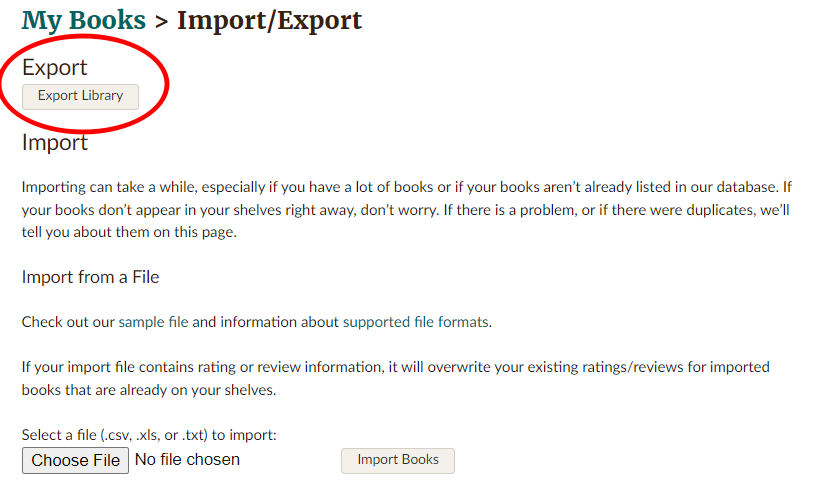
- You’ll be directed to a page on Goodreads called My Books > Import/Export.
- Select the button which says ‘Export Library’. Goodreads will create a CSV file for you with all your data. It could take a while if there are lots of books, but the link for the CSV will pop up under the ‘Export Library’ button when it’s read for you.
- Download it.
- Head back to The StoryGraph page you were on before, and in Step 2 you’ll see a button that prompts you to upload your CSV file you just downloaded from Goodreads. Select ‘Choose File’
- Find the CSV file in your Documents (probably in Downloads folder)
- In Step 3, click ‘Import Goodreads Library’.
- You’ll then be taken to a page which asks if you already track your Owned Books, and which shelf in Goodreads that you used to track those.
- Click Import!


Option 2: Through Manage Account when you already have a StoryGraph account
- Already have a StoryGraph account but didn’t import your Goodreads at the time of account creation? No worries! Head to TheStoryGraph.com and click on your profile image in the top right-hand corner.
- Select ‘Manage Account’ from the drop-down
- Scroll down to ‘Goodreads Import’
- Click ‘Import Goodreads Library’ button
- You’ll be shown the same start up page as if you started a new account (step 2 in Option 1 above)
- Follow the rest of the steps in Option 1 above!
It could take up to 24 hours to import the books if you have lots of books.
A word of caution: If your Goodreads lists are really messy, that’s going to translate over into a messy The StoryGraph, too. There were some things that I wish I had done on Goodreads before I imported Goodreads to Stroygraph. Things such as making sure I used the Owned It shelf, removing books that I actually didn’t own when GR said I did, not utilising my tags properly etc.
Another point to make: You can only import your books once, so make sure it’s how you want it before you start.

Should I move from Goodreads to The StoryGraph?
Obviously, I can’t decide that for you. There are Pros and Cons to both platforms, and I think it depends on how you like to track your books and your reading as to which might be better for you.
- If you like the familiarity of Goodreads, maybe stick with it.
- If you want a more personalised round-up of your reading, The StoryGraph is a brilliant option.
- If you like knowing you can find basically any book online, Goodreads is the one for you.
- If you love the idea of Buddy Reading, give StoryGraph a go.
Ultimately, whether you choose to move from Goodreads to The StoryGraph will depend on the features that are most important to you. If you want a more personalised experience, a cleaner interface and the ability to track series, then StoryGraph might be a good choice. However, if you value a wider selection of books, more reviews and ratings, and a more mature feature set, then Goodreads may be the better choice.
Or do both! Like I do!

How to use both Goodreads and The StoryGraph for tracking your books
I love Goodreads; I always have. But I’m also very familiar with it and there are some features that I think are sorely missing from the now-Amazon-owned platform.
Things such as half-star ratings, the ability to get a better idea of what I’ve read throughout the year, and more opportunities for connecting with other readers.
All those things, The StoryGraph offers. And they do it in a way that is beautiful and practical at the same time.
👉🏻 Check out my full, detailed review of The StoryGraph here.
But there are some things about The StoryGraph that I don’t love. I find some of the features and ways to update books a little clunky, and a little hard to find. They’re also a bit sparse in some of the details they give. They may be things that I just get used to as I navigate another platform, but it wasn’t as obvious for me to find things such as where to add my star ratings but not leave a written review etc.
And so I decided that for 2023, I’d try and use both. It’s been a few years now, and I continue to use both because I’m a creature of habit. Ha.
Each time I go to add my reading progress to Goodreads, I try to add the same information to StoryGraph. Yes, it’s doubling up and it’s working harder and not smarter, but come to the end of the year, I really want to be able to look back and see the books I’ve read in a beautifully automatically graphed way.
And The StoryGraph offers that to me.
So what’s the StoryGraph vs Goodreads verdict?
There are similarities between the two bookish platforms and some big differences. If you’re new to the book-tracking world, I’d jump straight into The StoryGraph, but if you’ve been on Goodreads forever (like I have!) then it may be a bit of a struggle to move across.
My recommendation is to use both for a set amount of time (a good chunk though! 6 months or a year) and see if The StoryGraph is the right book-tracking app for you.
You can check out my full review of The StoryGraph here, where I go into all the nitty-gritty details I can find about StoryGraph so you can really get a feel for the platform without signing up.
But I wanna know! Have you used The StoryGraph? Or are you a hard-core Goodreads fan? Let me know in the comments!

Anjali Kay
Anjali Kay is an Aotearoa New Zealand-based blogger and book lover sharing travel inspiration, bookish posts, the occasional creative project, and a lot of practical blogging tips here at This Splendid Shambles. Based in Auckland, she's been writing book reviews and travel posts, sharing creative projects and blogging tips since she started her first blog in 2009. When she's not working on her own blog, Anjali also offers blog coaching and support for bloggers who want real guidance from someone who's actually done the work, and is a few chapters ahead of them.


Having fun? Check out these posts!

Book Review :: The Binding, by Bridget Collins

Book Review :: King of Scars, by Leigh Bardugo
